1) 요소에 자기 위치가 살아있음
<!DOCTYPE html>
<html lang="ko">
    <head>
        <link rel="stylesheet" href="reset.css">
        <style>
        #s1 ul{
            background-color: darkred;
            height: 300px;
            width: 300px;
            position: relatvie;}

        #s1 li:nth-child(1){
            background-color: coral;
            position: relative;
            left: 50px;
            top: 30px;}

        #s1 li:nth-child(2) {background-color: darkslateblue;}
        #s1 li:nth-child(3) {background-color: lime;}
        </style>
    </head>

    <body>
        <section id="s1">
            <h3>position:relative</h3>
            <ul>
                <li>손흥민</li>
                <li>박지성</li>
                <li>김연아</li>
            </ul>
        </section>
    </body>
</html>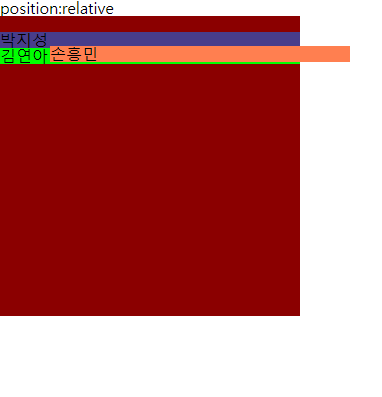
2) 부모의 위치를 지정
<!DOCTYPE html>
<html lang="ko">
    <head>
        <link rel="stylesheet" href="reset.css">
        <style>
        #s1 ul {
            background-color: yellowgreen;
            height: 300px;
            width: 300px;
            position: relative;
            left: 50px;
            top: 50px;}

            #s1 li:nth-child(1) {
                background: aquamarine;
                position: relative;
                right: 50px;}

            #s1 li:nth-child(2) {background-color: dodgerblue;}
            #s1 li"nth-child(3) {background-color: darkkhaki;}
        </style>
    </head>
    <body>
        <section id="s1">
            <h3>position:relative</h3>
            <ul>
                <li>손흥민</li>
                <li>박지성</li>
                <li>김연아</li>
            </ul>
        <section>
    </body>
</html>
- position:relative -> 상대적인 위치
'CSS' 카테고리의 다른 글
| [CSS] sticky (0) | 2024.06.01 |
|---|---|
| [CSS] fixed (0) | 2024.06.01 |
| [CSS] absolute (0) | 2024.05.31 |
| [CSS] static (0) | 2024.05.31 |
| [CSS] position (0) | 2024.05.31 |